Download MochaSoft software for macOS
The products can be tested before you actually buy them. Without a license key, the App has a 5/10 min. session limit.
The products are fully functional. When you order,
we will send a software license code, which will remove the limit.
The following packages contains the complete products, including documentation.
| macOS |
Version |
File |
Size |
|
| Mocha TN3812 for macOS |
1.2 (OX X 10.13.x - 14.x, older versions are not supported!) |
tn3812.dmg.zip |
3.6 Mb |
versions |
| macOS |
Version |
File |
Size |
| Mocha Keyboard for macOS (**) |
1.2 (OX X 10.9.x - 11.x (cannot run on 12 or later versions !) ) |
mochakeyboard.dmg.zip |
12 Mb |
(**) Without a license key, Mocha keyboard runs as a lite version, and does not include the backspace key.
TN5250 Version 2.1 has support for the older PPC CPU. From version 2.2, only the Intel CPU is supported. If problems with keyboard (F9,F10 and F11),
see our FAQ or use alt+f9, alt+f10... (or fn + f1 - f12)
How to downgrade to an older tn5250 version:
There is not an easy to use utility in macOS for such a task. A work around is
- Open a terminal window (application - utilities - terminal)
- Type following command
sudo pkgutil --forget dk.mochasoft.tn5250
If this fails, try
cd /Library/Receipts
sudo rm -r tn5250_install.pkg
Hereafter install the older version.
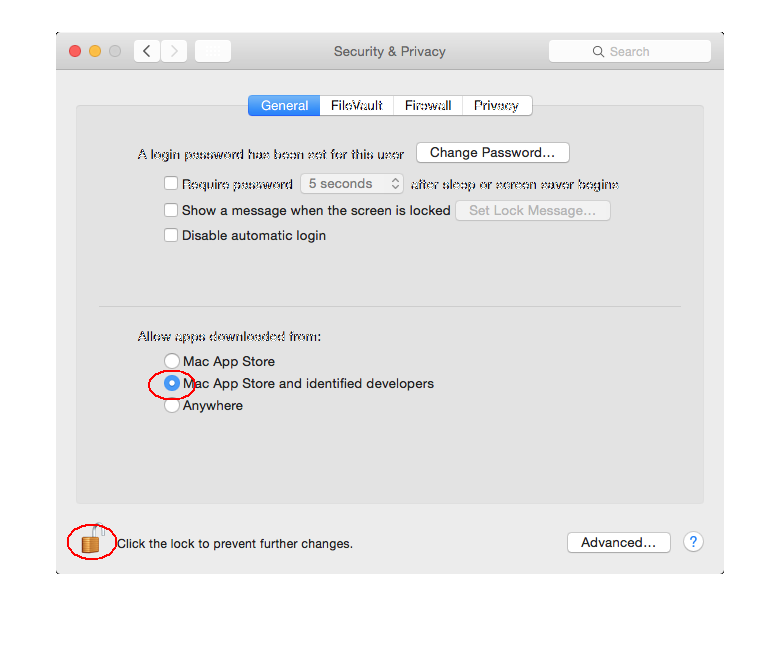
How to install on MacOS (Mountain Lion or better):
Turn on in system preferences - Security - Allow application download from "Mac App Store and identified developers"
You can also buy and download our mac software direct from Apple App Store
Notice, if you order a license key from http://mochasoft.com , it cannot be used with software downloaded direct from Apple App Store.

