

Frequently Asked Questions
General
- Difference between Lite and Paid version
- Any plans for SSH-2
- Caps Lock
- Copy a configuration to another device
Installation
- How to connect to a Telnet Server from the Internet (EDGE)
- How to enable the Telnet Server in Mac OS X Leopard
Troubleshooting
Difference between Lite and Paid version
The lite version (without a license key) has a 5 min. session limit.
Any plans for SSH-2
from version 2.2, SSH-2 is included.
Caps Lock
The iPhone does include a Caps Lock featureUsing the Caps Lock: Quickly tap the Shift key twice. Instead of the usual glowing arrow to indicate the next letter will be upper case, the whole Shift key turns blue to show Caps Lock Mode.
- Tap Settings
- Tap General
- Tap Keyboard
- Tap the Enable Caps Lock slider
Tapping the Shift key again turns Caps Lock back off.
Cannot make a connection to the Telnet Server
Either
- wrong IP address for the Telnet Server
- The Telnet server is not running
- A firewall stopping access on port 23.
- The iPhone/iPad is not on the same network as the Telnet Server
Backspace/Del key does not work
In telnet menu - settings - key values, there is as default
del = \177
backspace = \010
The QWERTY keyboard del was previous linked to "backspace", but now it is linked to del.
If your Telnet server ignores \177 it could be the reason for the problem. Change it to
del = \010 (zero one zero)
It is a new bug in v 2.1, and "backspace" entry will be removed in the next release.
How to connect to a Telnet Server from the Internet (EDGE)
To allow a connection with the iPhone on the EDGE network or another wifi network, maybe at your local Cafe, you must configure the router/firewall protecting your office network to allow traffic on port 23. This could be a security risk! Read the router manual for advice.
An example:
I have a router at my office, which connect to the Internet. It has IP address 88.1.2.44 on the Internet. The router has a fixed IP address on the Internet, if your internet provider (ISP) gives a dynamic address, a solution could be to use a service as NO-IP
Our Office Linux PC has a fixed IP address on the local network (wifi) at 192.168.2.2
In the router firewall configuration I have configured, if it receives data on port 23, forward it to 192.168.2.2.
When on the EDGE network with the iPhone, I will in Telnet as Server IP address write
- 88.1.2.44 , and as port 23 (Not the IP address for the Linux box!)
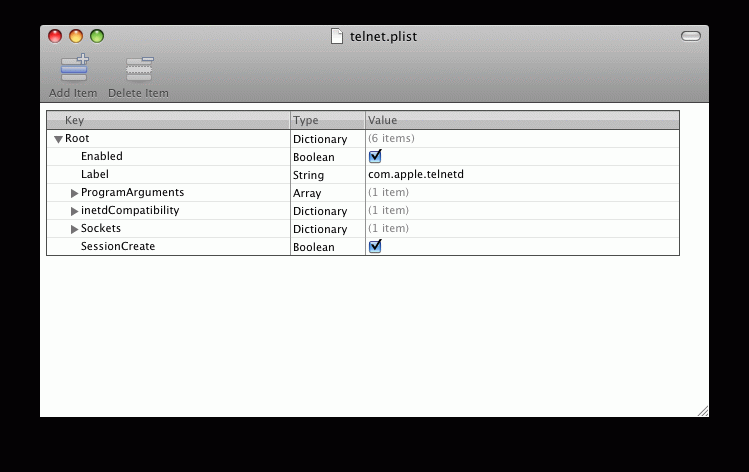
How to enable the Telnet Server in Mac OS X Leopard (10.5)
To enable the Mac OS X telnet server click in Finder on file /*System/Library/LaunchDaemon/telnet.plist*, and select enabled.
Hereafter the Mac must be rebooted.
Copy a configuration to another device
Export In menu - configure, click on "export", and the data for the first configuration will be send to the email program as an URL.
User id and password will not be copied.
Import Either send the email to the target device, or have the URL on a web page, which can be clicked in the Web browser on the target device.
Elements in the URL will overwrite the existing values in the configuration.
Syntax
Example:mochatelnet://CONFIG=192.168.2.100&port=23&ssh=0&name=&echo=0&start132=0&crlf=0& termtype=vt220&answer_back=MOCHA_TELNET&search1=ogin&search2=sswor&btkeyboard=0& keyclick=1&close_on_bg=0&btbarcode=0&barcode_enter=0&barcode_next=0&scannerkey=1& autolock=0&blink=1&color_text=16777215&color_bold=16711680&color_select=16744448& color_bg=0&color_cursor=65280&font=Courier%2DBoldOblique&user=&password=&barcode_ignore_first=0& barcode_ignore_last=0&linea_power=0&linea_battery=0&beep=1&iscan=0&text_blink=0&wireless_alt=1& zoom_height=1&autoconnect=0&lock=&mmacro_0=&mmacro_1=&mmacro_2=&mmacro_3=&mmacro_4=ff& mmacro_5=&mmacro_6=&mmacro_7=&mmacro_8=&mmacroname_0=&mmacroname_1=&mmacroname_2=&mmacroname_3=& mmacroname_4=&mmacroname_5=&mmacroname_6=&mmacroname_7=&mmacroname_8=&banner=1&ontop=0& knap_0=xhide&knap_1=xesc&knap_2=xtab&knap_3=xF1&knap_4=xF2&knap_5=xF3&knap_6=xF4& knap_7=xF5&knap_8=xF6&knap_9=xF7&knap_10=xF8&knap_11=xF9&knap_12=xF10&knap_13=xF11& knap_14=xF12&knap_15=xF13&knap_16=xF14&knap_17=xF15&knap_18=xF16&knap_19=xF17&knap_20=xF18& knap_21=xF19&knap_22=xF20&knap_23=xpgup&knap_24=xpgdn&knap_25=xmacro&knap_26=xenter& knap_27=x%3C%2D%2D&knap_28=x%5E&knap_29=xv&knap_30=x%2D%2D%3E&key_0=%5C011&key_1=%5C177& key_2=%5C010&key_3=%5C033%5BA&key_4=%5C033%5BB&key_5=%5C033%5BC&key_6=%5C033%5BD& key_7=%5C033OP&key_8=%5C033OQ&key_9=%5C033OR&key_10=%5C033OS&key_11=%5C033%5B15~& key_12=%5C033%5B17~&key_13=%5C033%5B18~&key_14=%5C033%5B19~&key_15=%5C033%5B20~& key_16=%5C033%5B21~&key_17=%5C033%5B23~&key_18=%5C033%5B24~&key_19=%5C033%5B25~& key_20=%5C033%5B26~&key_21=%5C033%5B28~&key_22=%5C033%5B29~&key_23=%5C033%5B31~& key_24=%5C033%5B32~&key_25=%5C033%5B33~&key_26=%5C033%5B34~&key_27=%5C033%5B1~& key_28=%5C033%5B4~&key_29=%5C033%5B5~&key_30=%5C033%5B6~&key_31=%5C033%5B2~& key_32=%5C033%5B3~&key_33=%5C033&key_34=&keepalive=0&Syntax:
mochatelnet://CONFIG=Server IP address&Parameters
0 = off, 1 = on
Parameters:
(*) button in use start with "x"
- port= menu - configure - server port
- ssh= menu - configure - ssh
- name= menu - configure - name (alias name)
- echo= menu - configure - local echo
- start132= menu - configure - start in 132 mode
- crlf= menu - configure - swap cr to crlf
- termtype= menu - configure - termtype
- answerback= menu - configure - answer
- search1= menu - configure - search for user
- search2= menu - configure - search for password
- btkeyboard= menu - configure - wireless keyboard
- keyclick= menu - configure - key click
- close_on_bg= menu - configure - close session on exit
- btbarcode= menu - configure - barcode scanner
- barcode_enter= menu - configure - send enter
- barcode_next= menu - configure - send TAB
- scannerkey= menu - configure - show scan key
- autolock= menu - configure - auto lock
- terminal_27x132= menu - configure - terminal 27x132
- blink= menu - configure - curosr blink
- color_text= menu - configure - colors - text
- color_bold= menu - configure - colors - bold
- color_select= menu - configure - colors - select
- color_bg= menu - configure - colors - background
- color_cursor= menu - configure - colors - cursor
- font= menu - configure - font
- user= menu - configure - user
- password= menu - configure - password
- barcode_ignore_first= menu - configure - barcode ignore first
- barcode_ignore_last= menu - configure - barcode ignore last
- linea_power= menu - configure - linea scanner power
- linea_battery= menu - configure - linea battery
- beep= menu - configure - beep sound
- iscan= menu - configure - mobilogics old mode
- text_blink= menu - configure - blinking text
- wireless_alt= menu - configure - wireless alt key
- zoom_height= menu - configure - zoom to height
- autoconnect= menu - configure - auto connect
- lock= menu - lock
- mmacro_0= menu - macros - macro 0 value
- mmacro_1= menu - macros - macro 1 value
- mmacro_2= menu - macros - macro 2 value
- mmacro_3= menu - macros - macro 3 value
- mmacro_4= menu - macros - macro 4 value
- mmacro_5= menu - macros - macro 5 value
- mmacro_6= menu - macros - macro 6 value
- mmacro_7= menu - macros - macro 7 value
- mmacro_8= menu - macros - macro 8 value
- mmacroname_0= menu - macros - macro 0 name
- mmacroname_1= menu - macros - macro 1 name
- mmacroname_2= menu - macros - macro 2 name
- mmacroname_3= menu - macros - macro 3 name
- mmacroname_4= menu - macros - macro 4 name
- mmacroname_5= menu - macros - macro 5 name
- mmacroname_6= menu - macros - macro 6 name
- mmacroname_7= menu - macros - macro 7 name
- mmacroname_8= menu - macros - macro 8 name
- banner= menu - configure - show key banner
- ontop= menu - configure - key banner on top of the 5250 screen
- knap_0= menu - configure - banner layout - value for first button (*)
- knap_1= menu - configure - banner layout - value for second button (*)
- ...
- key_0= menu - settings(keys) - tab
- key_1= menu - settings(keys) - del
- key_2= not used
- key_3= menu - settings(keys) - up
- key_4= menu - settings(keys) - down
- key_5= menu - settings(keys) - right
- key_6= menu - settings(keys) - left
- key_7= menu - settings(keys) - f1
- key_8= menu - settings(keys) - f2
- key_9= menu - settings(keys) - f3
- key_10= menu - settings(keys) - f4
- key_11= menu - settings(keys) - f5
- key_12= menu - settings(keys) - f6
- key_13= menu - settings(keys) - f7
- key_14= menu - settings(keys) - f8
- key_15= menu - settings(keys) - f9
- key_16= menu - settings(keys) - f10
- key_17= menu - settings(keys) - f11
- key_18= menu - settings(keys) - f12
- key_19= menu - settings(keys) - f13
- key_20= menu - settings(keys) - f14
- key_21= menu - settings(keys) - f15
- key_22= menu - settings(keys) - f16
- key_23= menu - settings(keys) - f17
- key_24= menu - settings(keys) - f18
- key_25= menu - settings(keys) - f19
- key_26= menu - settings(keys) - f20
- key_27= menu - settings(keys) - home
- key_28= menu - settings(keys) - end
- key_29= menu - settings(keys) - pgup
- key_30= menu - settings(keys) - pgdn
- key_31= menu - settings(keys) - insert
- key_32= menu - settings(keys) - delete
- key_33= menu - settings(keys) - esc
- keepalive= menu - configure - keep alive
Copyright (c) 1997-2024 MochaSoft Aps. All Rights Reserved. |