

Mocha VNC Setup Wizard - Configure network and iPhone VNC
An iPhone can either use WiFi or a phone network 3G/EDGE.
When you’re connected to WiFi with your iPhone, there’s a different indicator on the main iPhone screen ,than the one when you’re connected to 3G/EDGE network. The Edge network is a tiny ‘E’ up in the status bar. The WiFi indicator is the small inverted pie shaped strength meter.
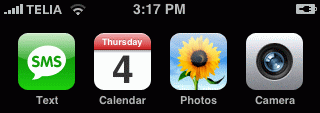
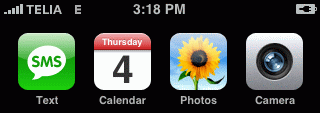
WiFi on WiFi off
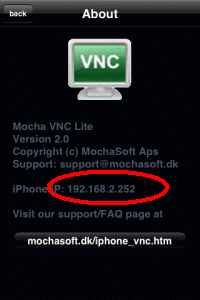
Another way to check the current network, is in VNC iPhone to select menu - about:
If the iPhone IP is in the range 192.168.xxx.xxx or 10.xxx.xxx.xxx , it is a local IP belonging to a WiFi.
Select type network
- Using local WiFi on the iPhone
- Using only 3G/EDGE on the iPhone
- Using Wifi on a public location as a Cafe
Copyright (c) 1997-2024 MochaSoft Aps. All Rights Reserved. |